Run it yourself
Run Lanes on your computer.
Three steps. Most of the time is waiting for make demo, which takes 8 to 12 minutes. Everything runs locally, and all the traffic is simulated.
- Docker with ComposeIt runs Flagsmith 2.295.2 and Postgres on port 8201.
- Python 3.9 or newer, and makeFor the project's own virtualenv.
- A terminalApprovals happen there, never in a browser.
Get the code
The code is not on a public host yet. Once you have the repository address, clone it and go into the folder.
$ git clone <repository address> t2-lanes
$ cd t2-lanes
Start it
Start Flagsmith, set up the Python environment, then run the four demos. make demo takes 8 to 12 minutes. It approves its own demo experiments, on a fresh project, so there is nothing to type.
$ docker compose up -d
$ make setup      # prints "setup ok"
$ make demo       # 8 to 12 minutes
Open it
The demo ends by printing a timeline. To see the same lane book in a browser, run this and open http://localhost:8211. The page is read-only.
$ LANES_HOME=$(ls -td .lanes/demo/demo_inter_*_lanes | head -1) make timelineWhat you should see Simulated traffic
Four verdict lines, then a timeline.
The demos cover pollution, interaction, A/A and early signal. They end like the saved run in make_demo.txt. Your numbers will differ within the intervals, because Flagsmith assigns the arms.
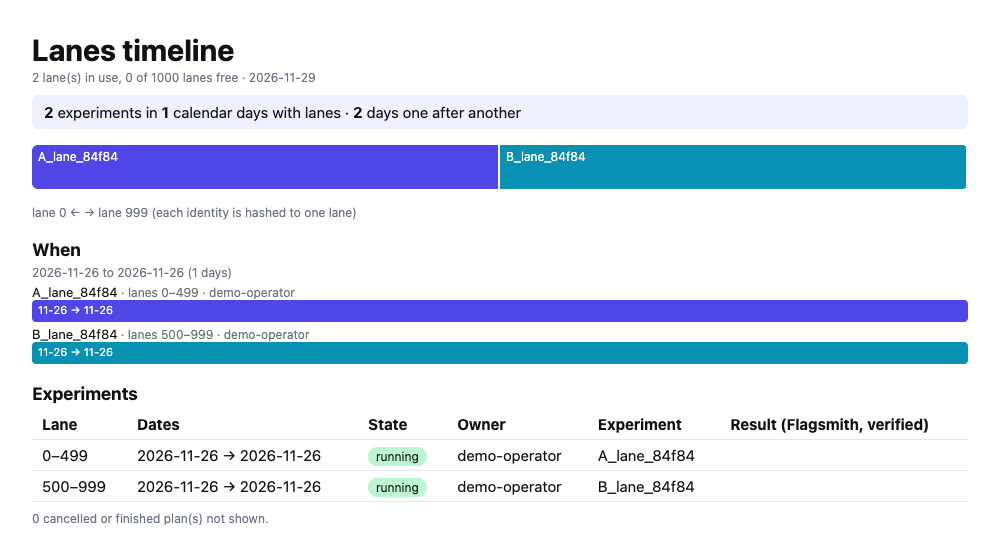
The timeline page, from a saved lane book of an earlier interaction demo run. Two experiments on the same days, no shared lanes.
Simulated. The users and conversions are generated, and the effect sizes are ones the demo script chose. The experiments, exposures and statistics are real, from your local Flagsmith.
If it does not work
Three things to check.
- Port 8201 is busy.Run
lsof -i :8201first. It may be someone else's Flagsmith. Then use another port.$ FS_PORT=8301 docker compose up -d $ export FLAGSMITH_URL=http://localhost:8301/api/v1
- "No virtualenv at .venv".Run
make setupfirst. The macOS systempython3has neither pytest nor the Flagsmith SDK, so the project uses its own.venv. - Your numbers differ from the saved output.That is expected. A conversion count can also read "GAP +5" for a few minutes, because Flagsmith counts new events late. Run
lanes verify --refreshagain after 5 minutes.
Unit tests need no Flagsmith: make test. To stop, run docker compose stop; it keeps your data. To remove generated credentials, run rm -rf ~/.config/lanes. Back to the product page.